PS2 BIOS for Beginners: Everything About PlayStation 2 BIOS and Gaming
Posted in CategoryGeneral Discussion Posted in CategoryGeneral Discussion-
Rudy soft 22 hours ago
PS2 BIOS for Beginners: Everything About PlayStation 2 BIOS and Gaming
The PlayStation 2 is remembered as one of the greatest gaming consoles of all time. From exciting action games to legendary racing adventures, it offered an incredible gaming experience that millions of players still appreciate. Even though modern gaming technology has advanced significantly, the popularity of classic PS2 games has never completely disappeared.
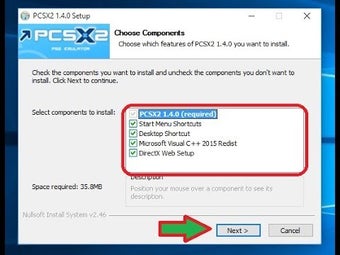
Nowadays, gamers can enjoy many PlayStation 2 titles on modern computers with the help of emulation software. However, one important part of this process is the PS2 BIOS. It helps recreate the original console environment and plays an essential role in configuring compatible emulators read more.
If you are new to PlayStation 2 emulation, this guide will help you understand everything about PS2 BIOS and its importance.
What Is PlayStation 2 BIOS?
PS2 BIOS is short for PlayStation 2 Basic Input/Output System. It is the firmware originally included inside the PlayStation 2 console.
Its main purpose is to manage essential system operations when the console starts. It initializes hardware components, prepares the system environment, and provides important functions required by PlayStation 2 software.
Whenever you switch on your original PS2 console, the BIOS begins working in the background. Although most players never interact with it directly, it is an important part of the console's operation.
Why Do Gamers Need PS2 BIOS?
PS2 BIOS is particularly important for people interested in playing PlayStation 2 games through emulation.
An emulator is a program that imitates the functionality of another system. In this case, it recreates important parts of the PlayStation 2 hardware and software environment on a different device.
PCSX2 is one of the best-known examples of PlayStation 2 emulation software. It uses a compatible BIOS to reproduce essential system functions.
Without the required BIOS functionality, the emulator may not be able to start games correctly. Therefore, BIOS configuration is an important step when preparing a PS2 emulator.
Main Functions of PS2 BIOS
The PlayStation 2 BIOS performs several important operations.
- Hardware Initialization: Prepares essential hardware components when the console starts.
- System Management: Provides important low-level system functions.
- Startup Operations: Helps the console prepare for running software.
- Regional Identification: Different releases are associated with different console regions.
- Software Support: Provides functionality used by PlayStation 2 applications and games.
These functions make BIOS firmware an essential part of the original PlayStation 2 architecture.
Different PS2 BIOS Versions
Sony released the PlayStation 2 in several regions, which resulted in different BIOS releases.
The most commonly recognized regional categories are:
USA BIOS: Associated with North American PlayStation 2 consoles.
Europe BIOS: Designed for European PlayStation 2 systems.
Japan BIOS: Associated with Japanese PlayStation 2 consoles.
Each version may contain different regional identifiers and system characteristics. Choosing a BIOS that matches your original console is a sensible approach when configuring an emulator.
PS2 BIOS and PCSX2 Emulator
PCSX2 is a popular emulator that allows users to enjoy compatible PlayStation 2 games on modern computers.
It offers several features that improve the overall gaming experience. Depending on the game and computer specifications, users can enjoy higher internal resolutions, customized controls, graphics enhancements, and different performance settings.
To configure PCSX2, users generally need a compatible BIOS dump obtained from their own PlayStation 2 console.
The emulator provides a configuration process that helps users select the BIOS directory and choose an available BIOS version.
Once the setup is complete, users can configure their controllers and add compatible game files.
Benefits of PS2 Emulation
Playing PlayStation 2 games through an emulator offers several advantages.
Improved Graphics: Supported games can run at higher internal resolutions, making some older titles look sharper.
Custom Controls: Players can configure keyboards and compatible controllers according to their preferences.
Save States: Certain emulators provide save-state functionality for convenient gameplay.
Flexible Settings: Users can adjust graphics, audio, and performance options.
Modern Compatibility: Emulation allows players to experience many classic titles on supported modern hardware.
These features help keep the PlayStation 2 gaming experience accessible to new generations.
How to Configure Your PS2 BIOS
Getting started with PS2 BIOS is relatively simple when you follow the correct steps.
First, visit the official PCSX2 website and install a supported version of the emulator.
Next, create a BIOS dump from your own PlayStation 2 console using an appropriate method.
Save the resulting files in a dedicated folder on your computer. Open PCSX2 and follow the initial configuration instructions.
When asked to select a BIOS directory, choose the folder containing your BIOS files. Allow the emulator to detect the available versions and select the appropriate option.
Finally, complete the remaining configuration steps and prepare your legally obtained PlayStation 2 games.
Common BIOS Setup Problems
Beginners sometimes experience problems during BIOS configuration.
If PCSX2 cannot detect your BIOS, check whether the selected directory is correct and whether the BIOS dump is complete.
If a game fails to start, check its compatibility with your emulator version and review the recommended configuration settings.
Keeping PCSX2 updated and following its official documentation can also help resolve common issues.
Always be careful when downloading files from unknown websites. Untrusted downloads may contain corrupted data or malicious software.
Legal and Safety Information
PS2 BIOS is copyrighted firmware developed by Sony. Its distribution and use are subject to applicable copyright laws.
The recommended method is to extract the BIOS from your own PlayStation 2 console using a supported process.
This approach helps users avoid unauthorized third-party BIOS downloads. It is also important to obtain game files legally and use trusted emulation software.
Conclusion
PS2 BIOS is one of the most important components of PlayStation 2 emulation. It helps compatible emulators recreate essential system functions and provides the foundation needed for running many classic PS2 games.
Understanding BIOS versions, regional differences, and emulator configuration can make the setup process easier, especially for beginners.
The PlayStation 2 remains a legendary part of gaming history. With modern emulation technology, players can continue enjoying its memorable games and discovering the magic of classic console gaming.